What Is an Invoice? Complete Beginner Guide for Freelancers & Small Businesses
Mar 13, 2026

What is an invoice? An invoice is a formal document requesting payment for products or services, showing costs, payment terms, and client details. It ensures timely payments, clear financial records, and professional communication for freelancers and small businesses.
Invoices are not only documents or files but also a pillar of any professional business deal. Understanding invoices is imperative whether you are a freelancer making your first client project or a business owner who must deal with several clients.
In the case of freelancers, invoices convey that they are professional and reliable. In the case of small businesses, they assist in simplifying accounting, avoiding conflicts, and ensuring effective communication with clients. A completed invoice consists of all the information that is required: details of the client, line items, tax, and payment date, as well as you’re branding to be recognized.
Freelancers find it easy to realize that simple, professional invoices get quicker responses, especially when they are branded and easy to read. Manual processes such as Word or Excel may require time, whereas web-based tools make the task easier and reduce errors.
Essentially, online invoice generators—such as those on e4tools—save hours of human effort, minimize mistakes and automatically compute totals and taxes, making the whole process of billing quicker and more accurate. Our free online invoice generator allows freelancers and businesses to create professional invoices instantly without manual calculations or formatting errors.
What Is an Invoice?
An invoice refers to a document which a seller transfers to a buyer specifying the products or services being offered as well as the sum due and terms of payment. It is not like a receipt, where an invoice requires payment; a receipt proves that it has been received.
According to Investopedia, an invoice as a financial record and bookkeeping tool serves as a formal record of a transaction between buyer and seller and is essential for maintaining accurate financial records, internal controls, and proper accounting.
Freelancers, contractors, small businesses, and the service providers utilize invoices to maintain clear visibility of financial transactions. For example, freelancers tend to add the work hours, fees, taxes and overall expenses in invoices so that the clients know the charges and to prevent conflicts.
There are various types of invoices: standard, recurring, credit memo, and proforma invoices. The most common and appropriate to use with one-time projects is a standard invoice. Ongoing services such as monthly subscriptions are recurring invoices, and proforma invoices are preliminary invoices common in international trade.
Businesses are also demonstrating credibility and accountability through professional issuance of the invoices, which may result in greater trust and immediate payment by the clients. Online tools allow you to make invoices in real time without any concerns regarding style formatting, errors in calculation, and missing numbers, making the entire process more efficient and error-free.
Why Businesses and Freelancers Use Invoices

Invoices play a critical role in financial operations. They can be viewed as a legal document of the transaction that can assist businesses and freelancers in following payments, taxes, or client history.
Many accounting platforms, such as FreshBooks, explain the purpose and benefits of invoicing for small business accounting, showing how invoices not only request payment but also support accurate bookkeeping, tax records, and legal documentation, helping businesses manage finances systematically and avoid errors.
Invoices are occasionally sent manually through email, which may lead to misunderstanding, omission of information or mathematical mistakes. Online invoice generators would assist in getting rid of these problems by automatically compiling totals, adding taxes, and keeping the format professional, which saves a lot of time.
Some key benefits of using invoices:
Professional Payment Requests – An invoice demonstrates to clients that you are serious about your work.
Financial Record-Keeping – Assists in tax season or audit work.
Avoids Misunderstandings – Clearly identifies items, quantities, rates and due dates.
Time-Saving Automation – Automation is particularly useful with the use of digital invoice generators.
Enhances Cash Flow – When invoices are accurate and professional, clients make payments more quickly.
In the case of freelancers, it will result in less time spent on collecting payments and more dedicated to producing quality work. In the case of small businesses, it facilitates smooth operation, particularly with dealing with several clients and projects.
What Should an Invoice Include?
The full invoice must have all the information to prevent any confusion or delays. The following are the steps that should be considered:
Personal Tip: I always include a small “Thank You” note at the bottom. It builds goodwill with clients and can even encourage repeat business.
Using the e4tools Invoice Generator, all these fields are prebuilt, and you can customize branding, currencies, and taxes instantly. No manual formatting or calculation errors.
Example of a Simple Invoice Structure
Here’s a real-world example based on my experience:
Subtotal: $550
Tax(10%): $55
Total Due: $605
Generate Multi-Page Invoices Easily
This design makes clients clearly understand what they are paying. Other notes such as payment instructions or terms may be added as well.
A common scenario: when invoices are prepared manually, they might contain errors and indistinct subtotals. An online invoice generator would make sure that totals are correct, and the formatting is proper so that it is less likely to cause results to get confused and allow the payment to come in good time.
You could also get multi-page invoices, generate totals automatically and automatically send a PDF or a link to clients by using online generators.
Invoice vs Receipt: What’s the Difference?
Understanding the difference is essential:
Invoice: A demand before the client has paid.
Receipt: It is demonstrated that payment has taken place.
Examples: I charge a client web design services amounting to $500. After receiving the payment through PayPal, I create a payment confirmation receipt.
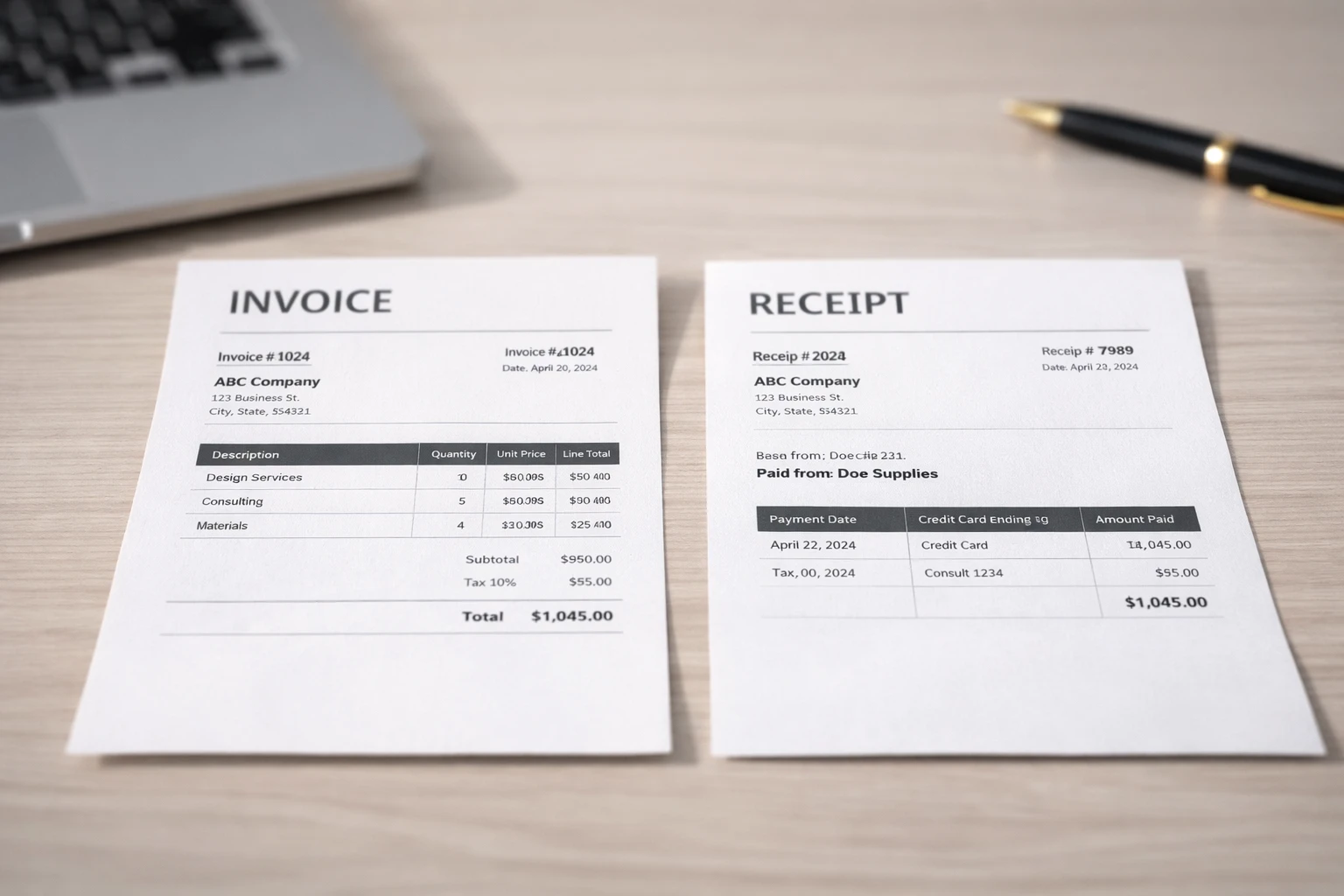
Comparison Table:
Being aware of this difference helps avoid confusion and enable adequate financial record-keeping. Special labelling helps freelancers and small businesses to have no disputes and proper accounting.
How to Create an Invoice Online
Creating invoices online is faster, accurate, and professional. Here’s my step-by-step process using e4tools:
Enter business information – name, logo, address.
Add client details – name, email, and contact info.
Add Services or Products – Include description, quantity, price, taxes, and discounts.
Set Payment Terms – Due date and payment method.
Download or Share – Generate a PDF or share a secure link.
Online invoice tools can save a lot of time in the process of making invoices. The same task which might consume 30-40 minutes in manual mode can be over in less than 5 minutes using automated tools.
If you want a deeper walkthrough, check our detailed guide on how to create a professional invoice online, where we explain every step with examples.
Common Invoice Mistakes to Avoid

Avoid these mistakes for professional and smooth transactions:
Missing invoice number or client info
Incorrect totals or tax calculations
Not specifying due date or payment terms
Confusing invoices with receipts
Poor formatting, missing branding
Story: A client who is a freelancer that I consulted has paid late since they do not have due dates and clear totals on their invoices. The problem was solved by updating invoices with appropriate templates and the online generators.
Note: Check an invoice before submitting it and use a reminder note if payment is delayed.
FAQs
What is an invoice? An invoice is a formal document used by a vendor to demand payment of a product or service. It contains detailed costs, relevant taxes, payment conditions, and client information so that everything is clear and correct financial documentation. Invoices also assist freelancers and small businesses to be professional and ensure payments are made on time without any misunderstanding. Get the instructions on how to make one via our free online invoice generator.
In the case of a freelancer, an invoice is a formal payment request indicating the services provided, hours taken, rates and taxes obtained. It keeps clients informed about what they are paying and assists in tracing the finances effectively.
Critical areas are information about business, customer records, itemized line items, taxes, discounts, and terms of payment. Online tools can be used to hasten the process and make sure that everything is calculated correctly and systematic, professional, and branded invoices are created in an efficient way. Formatting and clarity are taken into careful consideration to avoid conflicts and payment delays.
A complete invoice must contain:
Business and client details
Itemized services/products
Subtotals, taxes, and discounts
Total amount due and payment terms
Unique invoice number and date
Putting all this information will avoid arguments and other misunderstandings. Financial tracking and accounting are facilitated by properly structured invoices. To have ready-made examples, visit our invoice templates guide.
Beginners can learn invoicing through templates and guides or invoice generators available online. It is crucial to know what an invoice is, required fields, correct formatting, and tracking payment. Structured examples and guides can assist beginners to make proper, professional invoices quickly.
Self-employed individuals should include:
Full business and client information
Detailed descriptions of services
Rates, hours, and totals
Taxes, discounts, and payment terms
Following this structure provides proper professional invoices. Different online tools may also ease the process, eliminate possible errors in calculations, and save time on self-employed professionals who must deal with multiple clients.
No. An invoice is a confirming request of payment prior to the client making a payment, whereas a receipt is a confirming statement of the receipt of payment. Freelancers and small businesses are encouraged to send invoices beforehand and later send receipts to have precise and clear financial records.
Invoices must be submitted upon the delivery of a service or product, or as dictated by the terms of a contract. Timely invoicing enhances cash flow, minimizes delay of payments, and preserves professional communication. It is also important that invoices are properly formatted and clear to ensure that clients pay quicker.
Yes, digital tools such as our Free Online Invoice Generator can allow the freelancer to develop invoices online. Online invoices save time, automatically compute totals and taxes, provide professional formatting, and increase the possibility of timely payment by lowering financial management challenges among freelancers and small businesses.
Conclusion
Through what is an invoice guide, it has been revealed that invoices help freelancers and small businesses to handle professionalism, keep precise records and maintain a steady flow of payments. An effective invoice is associated with trust, clarity, and order.
As a personal experience, online invoice generators save hundreds of work hours, eliminate possible calculation errors, and make each invoice look professional and branded. Digital tools help in the process whether you are sending one invoice or handling more than one client.
Start creating professional invoices in seconds using the Free Online Invoice Generator on e4tools. With prebuilt templates, automatic totals, and PDF download, you can focus more on your business and less on manual billing.
You can also explore more free business tools on e4tools to simplify tasks like document creation, calculations, and productivity for freelancers and small businesses.