Scientific Calculator Functions Explained (sin, log, ln, π, e & more)
May 07, 2026
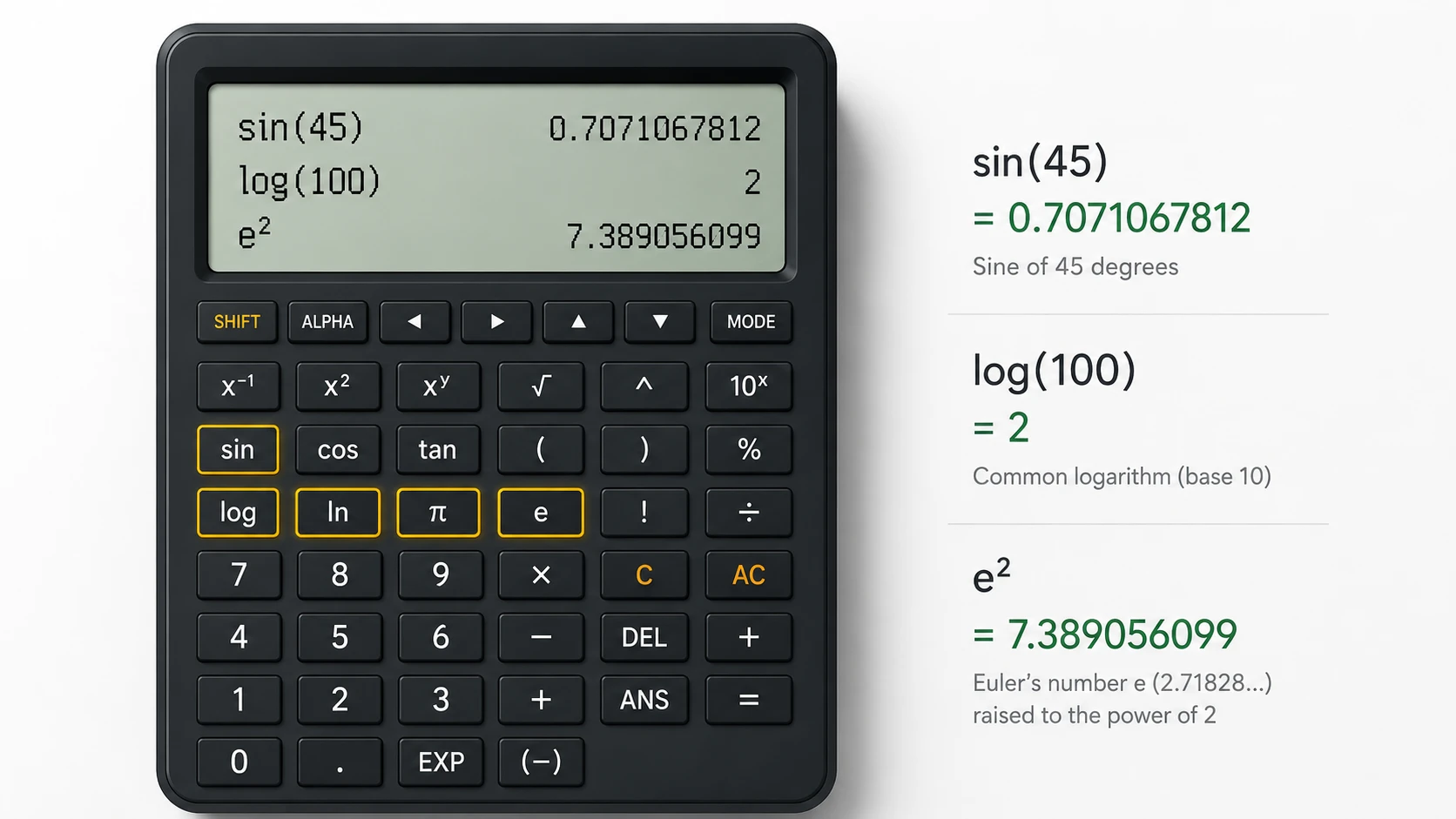
Scientific calculator functions explained are built-in mathematical operations such as sin, log, ln, π, and e that are used to solve complex scientific, mathematical, and engineering calculations.
Confused between log and ln calculator functions? Not sure what the “e” button actually does? Or wondering why your calculator sometimes gives unexpected results even when your formula is correct?
You’re not alone.
Calculators are used by most of the students, engineers, and other professionals in their daily routines, yet very few people really know how the operations of scientific calculators explained really work behind the scenes. This gap in understanding leads to mistakes, confusion, and lost marks in exams or incorrect results in real-world calculations.
This guide is not just a list of functions. The calculator always follows logic exactly as written—there is no interpretation layer like humans.
It’s a complete learning system where you’ll understand the following:
What does each function really mean
Why these functions exist
Where they are used in real life
How to use them correctly step-by-step
Why mistakes happen—and how to avoid them
By the end, you won’t just use a calculator, you’ll understand how it thinks.
The Calculator Confusion Pattern
Most errors in scientific calculators don’t come from difficulty in math.
They come from a repeated pattern:
Wrong function choice
Wrong input structure
Wrong mode setting
This is why most students struggle with scientific calculator functions.
This creates what we can call:
“Calculator Confusion Pattern”
Once you recognize this pattern, solving problems becomes more about clarity than memorization.
The Calculator Execution Framework
Before learning individual functions, you need to understand one powerful concept:
A calculator does NOT think — it executes.
To make this simple, think of every calculation as a 3-step system:
Input → Function → Output
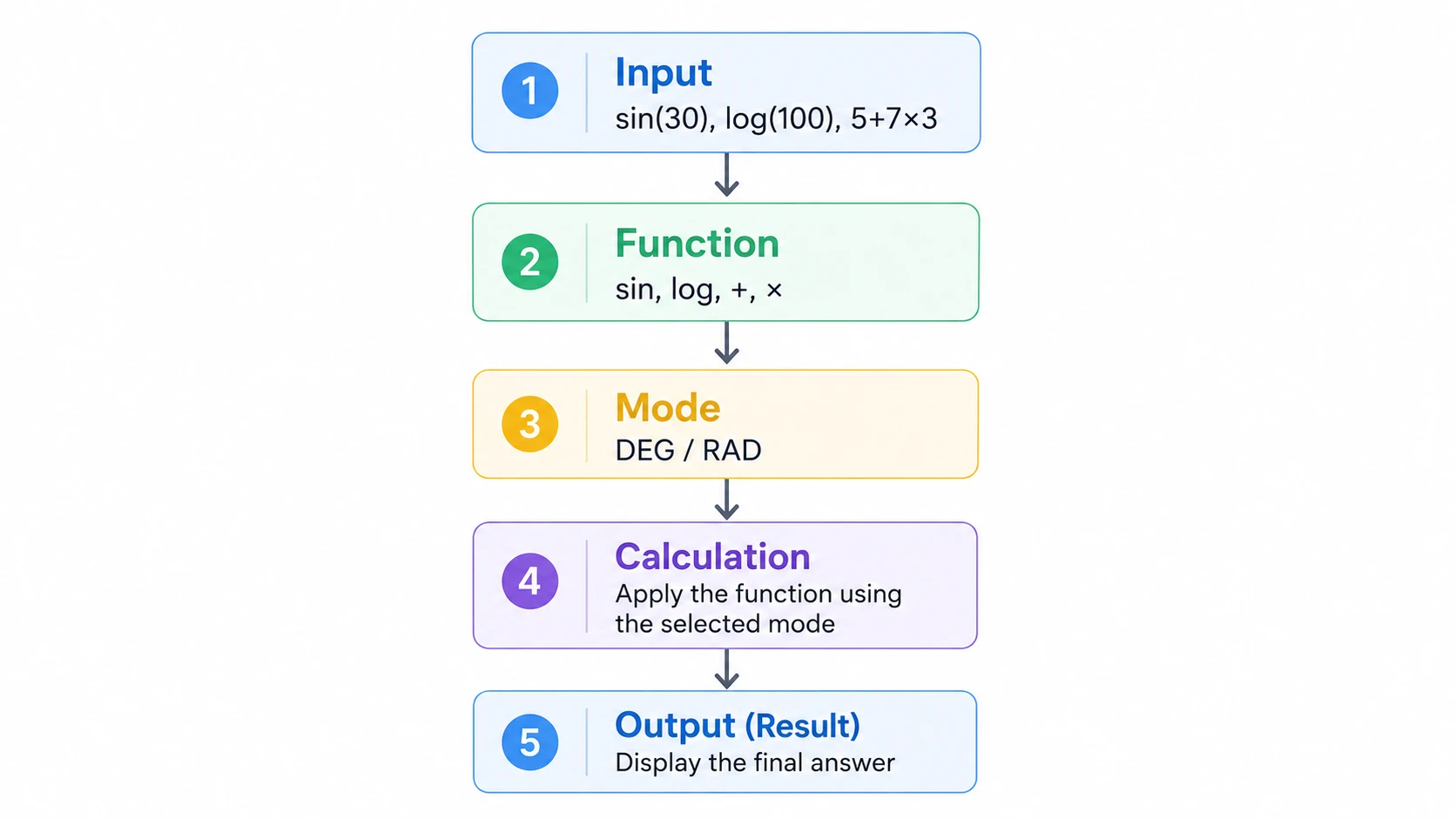
1. Input (What you type)
This is the mathematical expression you enter.
Example: sin (30), log (100), e²
2. Function (What rule is applied?)
This is where the calculator uses mathematical logic like trigonometric functions, logarithmic functions, or exponential functions.
3. Output (What you get)
The final result is produced strictly based on your input and selected function.
To understand how reliable these results are in real-world use, you can also read are online scientific calculators accurate, which explains precision, rounding, and real calculation behavior.
Expert Insight:
If your answer is wrong, the problem is almost always in the following:
- The input structure
- The function selection
NOT the calculator itself.
This is why understanding scientific calculator functions explained is more important than just pressing buttons.
What Are Scientific Calculator Functions?
Scientific calculator functions are mathematical operations built into a calculator that allow you to:
Evaluate expressions
Solve equations
Perform real-world math calculations
Handle engineering calculations
Practice Scientific Calculator Functions Now
Unlike basic calculators, these include:
Trigonometric functions
Logarithmic functions
Exponential functions
Mathematical constants
For a broader mathematical definition, you can explore scientific calculator overview, which explains how these calculators are structured and used in education.
Why Do These Functions Exist?
Because real-world problems are not linear.
Real examples:
In physics, wave motion uses sine and cosine.
In engineering, angles and forces require trigonometry.
In finance, growth models use exponential functions.
In chemistry, reactions use logarithmic scales.
This is why scientific calculator functions for students, explained simply, are not just academic—they're practical.
Types of Scientific Calculator Functions
1. Trigonometric Functions (sin, cos, tan)
These are among the most used mathematical functions in calculator systems. For a clear and reliable explanation of how these functions work, you can explore trigonometric functions definition and examples, which explain sine, cosine, and tangent with real mathematical context.
What Do They Do:
sin → measures vertical ratio
cos → measures horizontal ratio
tan → ratio of slope
Real-World Use Case:
Why Engineers Use sin & cos
Calculating bridge angles
Resolving force directions
Signal wave analysis
Step-by-Step Example:
How to use sin, cos and tan on a scientific calculator step by step
Find sin (45°):
Enter 45
Select DEG mode
Press 'sin'.
Result:
0.7071
Common Mistake:
Wrong mode (DEG vs RAD)
Real-Life Student Example
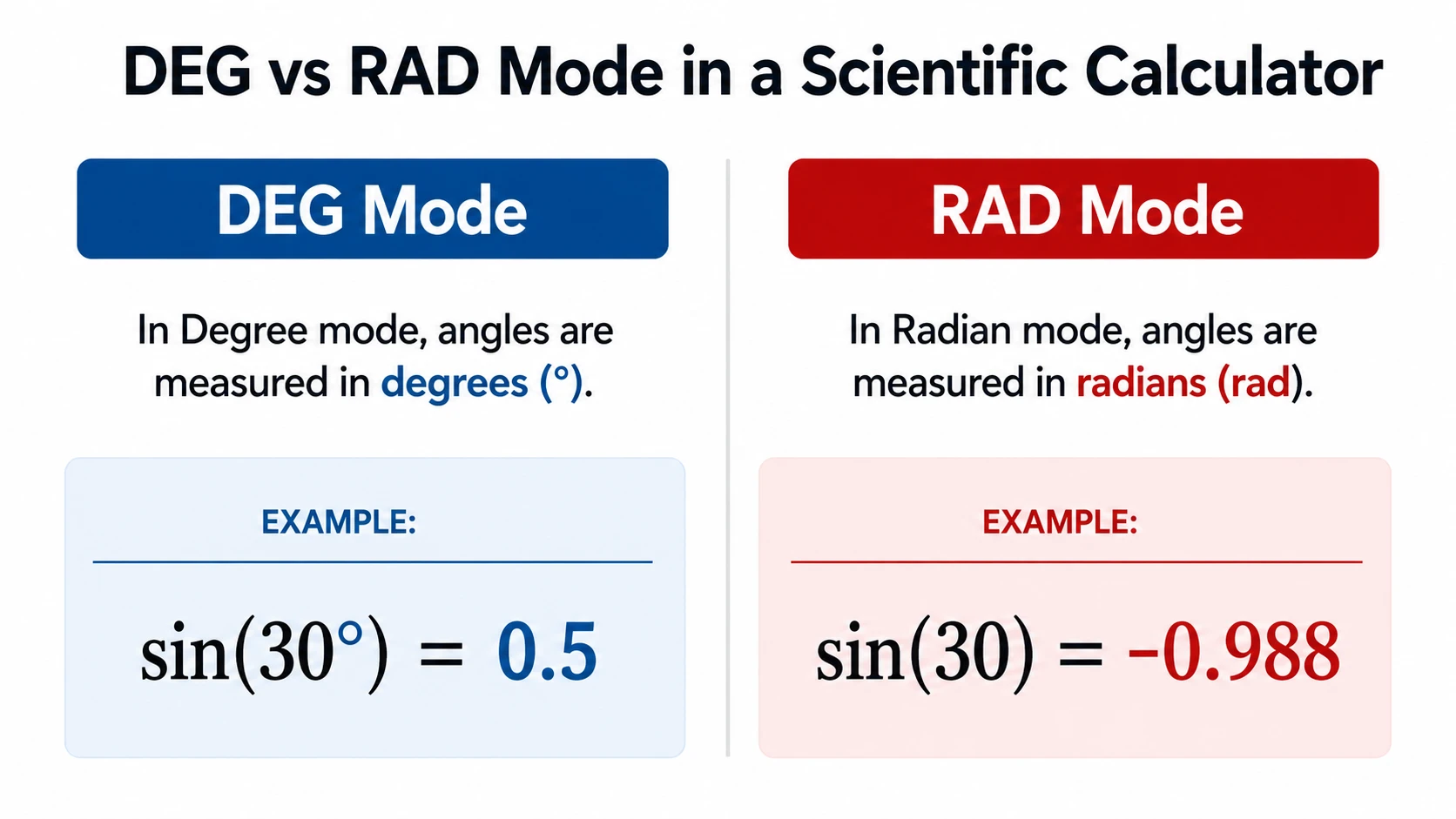
In one practice session, something interesting happened while solving a simple trigonometry problem.
I entered:
sin (30)
Expected result:
0.5
But the calculator showed:
-0.988
At first, it looked like the calculator was wrong. But after checking carefully, the issue wasn’t the function—it was the mode. The calculator was set to RAD instead of DEG.
Same function. Same input. Completely different meaning.
The key confusion happens because calculators don’t assume angle type—you must define whether the system is measuring degrees or radians.
Degrees are human-friendly (used in classrooms), while radians are mathematically natural (used in advanced math and physics).
This is exactly why understanding scientific calculator functions explained is more important than just pressing buttons.
This is a major reason behind confusion in sin, cos and tan calculator usage.
2. Logarithmic Functions (log, ln)
Understanding log vs ln
Why log and ln feel confusing to students
Most students think log and ln are just different buttons, but the real difference is deeper.
log is tied to base 10 (used in human-scale calculations like grades and finance basics)
ln is tied to natural growth patterns found in nature
That is why ln appears in physics and biology formulas, while log is mostly used in simpler mathematical scaling.
Understanding this difference is not memorization, it is understanding how nature itself behaves mathematically.
Why This Concept Matters
ln exists because many natural processes follow exponential growth based on Euler’s number (e).
This includes:
Population growth
Radioactive decay
Continuous interest
This is why understanding what 'ln' is on a scientific calculator and how to use it is critical.
Real Use Case:
In physics:
Exponential decay formula → uses ln
NOT log
Common Mistake:
Using log instead of ln
This breaks equations completely and is a major topic in:
Common calculator mistakes
Are scientific calculators accurate?
3. Exponents & Powers
These represent repeated multiplication.
Functions:
x² → square
√ → square root
EXP → exponential notation
Real Use Case:
Area calculations
Growth modelling
Data scaling
Example:
Calculate 5²:
Steps:
Enter 5
Press x²
Result: 25
4. Constants (π, e)
These are fixed values used across formulas.
π (Pi)
Value ≈ 3.1416
Used in circles
Formula:
Area = πr²
e (Euler’s Number)
Value ≈ 2.718
These answers:
What does 'e' mean in a scientific calculator's exponential function?
Real Use Case:
Finance → compound interest
Biology → population growth
Physics → decay processes
5. Memory Functions (M+, MR, MC)
These functions manage stored values.
Functions:
M+ → add value
MR → recall
MC → clear
Real Problem:
Stored values affect new calculations silently.
This is a hidden issue most users don’t even realize—stored values silently affect new calculations.
Case Study: When a Student Lost Marks Due to log vs ln Confusion
A student was solving a physics assignment on exponential decay.
The formula required:
ln
But he used:
log
At first, everything looked correct in his calculator steps.
But the final answer was completely wrong.
He rechecked formulas, tried again, and still got the wrong result.
Finally, the issue was identified:
The problem was NOT the calculator.
The problem was incorrect function selection.
After switching from log to ln, the answer matched perfectly.
Lesson:
This is exactly why understanding scientific calculator functions explained is more important than memorizing formulas.
Practical Examples of Calculator Functions
Example 1: Trigonometry
sin (45°) = 0.7071
Example 2: Logarithm
log (100) = 2
Example 3: Exponential
e² = 7.389
Example 4: Mixed Expression
(5 + 7) × 3 = 36
This is where most people get confused—the calculator isn’t wrong; the structure is.
This is a hidden issue in calculator input methods.
Key Takeaway from These Examples:
Each result depends on:
Correct function selection
Proper input structure
Correct mode (DEG/RAD)
Even a small mistake in any of these changes the final answer completely. If you want to test these examples yourself, try them directly in a free online scientific calculator for instant results and better understanding.
Why Calculators Don’t Understand Your Intent
Here’s a critical concept:
Calculators execute structure, not meaning.
If you enter:
5 + 7 × 3
You get:
26
NOT 36
Same Function, Different Understanding
Here’s a simple comparison that explains why results differ between users:
The calculator is the same, the difference is only how it’s used.
Insight:
This is exactly why many students feel the calculator is “wrong” when it’s actually following the correct structure.
Before vs. After Understanding Calculator Functions
To clearly see the difference in learning, let’s compare how users perform before and after understanding scientific calculator functions explained.
This shows real improvement, not theory.
Why Students Still Get Wrong Answers
Even after learning formulas, many students still lose marks in exams—not because they don’t understand math, but because they don’t understand calculator functions.
Common patterns include:
Using log instead of ln
Ignoring DEG vs RAD mode
Entering expressions without structure
Trusting output without verification
This is not a math problem, it’s a function-understanding problem. Most of these issues are explained in detail in scientific calculator mistakes beginners must avoid, where real exam patterns and fixes are covered step-by-step.
Why Students Emotionally Trust Calculators Too Much
One interesting behavior among students is that they trust calculator results more than their own understanding.
If the calculator shows an answer, they assume it must be correct—even when the setup is wrong.
For example:
Wrong mode (RAD instead of DEG)
Wrong function (log instead of ln)
But instead of questioning the input, students often question the math itself.
This creates a hidden learning problem:
They trust the tool more than the concept.
The truth is:
A calculator is only as correct as the input it receives.
This is why scientific calculator functions explained are not just technical knowledge, but their decision-making skills.
Once you understand how functions work, accuracy improves instantly.
How Professionals Think Differently About Calculators
Most students and professionals use the same calculator, but the way they approach it is completely different.
Beginners usually focus on getting the answer quickly.
But professionals focus on something deeper:
They follow a verification mindset before solving anything.
For example:
They first check the correct function (log vs ln)
They confirm the correct mode (DEG or RAD)
They verify the input format before pressing equals
This small shift changes everything.
Instead of asking:
“What is the answer?”
They ask:
“Is my input structured correctly for this function?”
This mindset replaces guesswork with clarity.
Once you develop this way of thinking, calculator mistakes reduce dramatically.
Why Calculators Don’t Understand Your Intent
Common Mistakes When Using Functions
Wrong mode (DEG/RAD)
Using the wrong function (log vs ln)
Missing brackets
Memory carry-over
These common mistakes are explained in detail in our calculator mistakes guide.
How to Use These Functions in an Online Calculator
Here’s a reliable system:
Step 1: Enter Expression
Use proper structure.
Step 2: Select Function
sin, log, ln, etc.
Step 3: Check Mode
DEG or RAD
Step 4: Execute
Press =
Step 5: Verify
Double-check output
You can practice using an online scientific calculator tool, which helps you improve accuracy, test DEG/RAD changes, and avoid common input mistakes in real time.
Who Should Use These Functions?
Students
Homework
Exams
Assignments
Engineers
Structural calculations
System modelling
Teachers
Demonstrations
Concept explanation
FAQs
It is the natural logarithm based on Euler’s number (e), used to calculate exponential growth and decay in mathematics, physics, finance, and scientific modelling.
log uses base 10 for general calculations, while ln uses base e for natural scientific processes like continuous growth, decay, and modelling in physics and mathematics.
e is Euler’s number (≈2.718), a mathematical constant used in exponential functions to represent continuous growth, decay, and real-world natural processes.
Enter the angle value, select the correct mode (DEG for degrees or RAD for radians), then press sin, cos, or tan to calculate the trigonometric result.
The most common mistakes happen because of improper input structure, wrong mode selection (DEG/RAD) or using the wrong type of function. The calculator itself is not faulty but adheres to strict mathematical rules; it only gives incorrect answers when used with an incorrect setup. This is why understanding scientific calculator functions explained is essential for accuracy and correct problem-solving.
They are built-in mathematical operations such as trigonometric, logarithmic, and exponential functions that help solve complex calculations quickly and accurately in mathematics, science, and engineering.
A scientific calculator performs trigonometric, logarithmic, exponential, and statistical functions used in mathematics and science.
ln is commonly used in physics for exponential decay and natural growth models, while log is used for base-10 scaling.
By ensuring correct input structure, selecting proper function, and verifying DEG/RAD mode before solving.
Conclusion
Understanding scientific calculator functions explained is not about memorizing buttons—it is about learning how mathematical thinking is executed step by step.
When you understand:
Function logic
Input structure
Real-world application
You stop relying on guesswork and start thinking clearly.
The real shift happens when you realize that mistakes are not mathematical, they are structural.
What changed everything was not the calculator—it was understanding how each function actually works.
Explore Advanced Scientific Calculator